ROS 2 Cheat Sheets
2024-12-14
Table of Contents
- ROS 2 Environment Configuration Cheat Sheet
- Commands and Explanations
- 1. Source the Setup Files
- 2. Add Sourcing to Shell Startup Script
- 3. Check Environment Variables
- 4. Set the ROS_DOMAIN_ID Variable
- 5. Set the ROS_AUTOMATIC_DISCOVERY_RANGE Variable
- Turtlesim and ROS2 Cheat Sheet
- 1. Install Turtlesim
- 2. Start Turtlesim
- 3. Control the Turtle
- 4. Install and Use RQT
- 5. Use RQT Service Caller
- 6. Spawn a New Turtle (Service Call)
- 7. Change Pen Settings (Service Call)
- 8. Remap Topics for Multiple Turtles
- 9. Stop Turtlesim
- Understanding Nodes in ROS 2 Cheat Sheet
- The ROS 2 Graph
- Nodes in ROS 2
- 1. ros2 run
- 2. ros2 node list
- 3. ros2 node info
- 3.1 Remapping Node Names and Topics
- ROS 2 Topic Commands Cheat Sheet
- Topics in ROS2
- 1. rqt_graph (Graphical Tool):
- 2. ros2 topic list:
- 3. ros2 topic echo:
- 4. ros2 topic info:
- 5. ros2 interface show:
- 6. ros2 topic pub:
- 7. ros2 topic hz:
- 8. ros2 topic bw:
- 9. ros2 topic find:
- ROS 2 Services Cheat Sheet
- Services in ROS2:
- 1. List Active Services:
- 2. Service Type:
- 3. Service Info:
- 4. Find Services by Type:
- 5. Show Service Interface:
- 6. Call a Service:
- 7. Echo Service Data:
- ROS 2 Parameters Cheat Sheet
- Parameters in ROS2:
- 1. ros2 param list
- 2. ros2 param get
- 3. ros2 param set
- 4. ros2 param dump
- 5. ros2 param load
- 6. Load Parameter File on Node Startup
- ROS 2 Actions Cheat Sheet
- Overview of Actions
- 1. ros2 node info
- 2. ros2 action list
- 3. ros2 action type
- 4. ros2 action info
- 5. ros2 interface show
- 6. ros2 action send_goal
- Using rqt_console to view logs
- 1. Setup
- 2. Messages on rqt_console
- 3. Set the Default Logger Level
- Recording and Playing Back Data in ROS 2
- Managing Topic Data
- 1. Setup
- 2. Choose a Topic
- 3. Record Topics
- 4. Inspect Topic Data
- 5. Play Topic Data
- Managing Service Data
- 1. Setup
- 2. Check Service Availability
- 3. Record Services
- 4. Inspect Service Data
- 5. Play Service Data
ROS 2 Environment Configuration Cheat Sheet
Commands and Explanations
1. Source the Setup Files
source /opt/ros/<distro>/setup.bash- Activates ROS 2 in the current shell session by setting necessary environment variables.
- Replace
<distro>with the name of your installed ROS 2 distribution (e.g.,humble,galactic,jazzy).
2. Add Sourcing to Shell Startup Script
echo "source /opt/ros/<distro>/setup.bash" >> ~/.bashrc- Automatically sources ROS 2 every time you open a new shell.
- Modify
~/.bashrcto include the source command.
Undo this step:
- Edit the
~/.bashrcfile manually to remove the line added.
3. Check Environment Variables
printenv | grep -i ROS- Verifies if ROS environment variables are correctly set (e.g.,
ROS_DISTRO,ROS_VERSION).
4. Set the ROS_DOMAIN_ID Variable
export ROS_DOMAIN_ID=<your_domain_id>- Sets a unique domain ID for communication between ROS 2 nodes.
- Add to
~/.bashrcfor persistence:
echo "export ROS_DOMAIN_ID=<your_domain_id>" >> ~/.bashrc5. Set the ROS_AUTOMATIC_DISCOVERY_RANGE Variable
export ROS_AUTOMATIC_DISCOVERY_RANGE=<range_value>- Limits ROS 2 discovery range, useful in environments with multiple robots.
- Add to
~/.bashrcfor persistence:
echo "export ROS_AUTOMATIC_DISCOVERY_RANGE=<range_value>" >> ~/.bashrcTurtlesim and ROS2 Cheat Sheet
1. Install Turtlesim
- Install Turtlesim:
sudo apt update
sudo apt install ros-<ros2-distro>-turtlesim- Check installed executables:
ros2 pkg executables turtlesim2. Start Turtlesim
- Launch the turtlesim node:
ros2 run turtlesim turtlesim_node3. Control the Turtle
- Launch the teleop node to control the turtle:
ros2 run turtlesim turtle_teleop_keyAdditional ROS2 commands:
- List active nodes:
ros2 node list- List available topics:
ros2 topic list- List available services:
ros2 service list- List available actions:
ros2 action list4. Install and Use RQT
- Install RQT and plugins:
sudo apt update
sudo apt install '~nros-<ros2-distro>-rqt*'- Launch RQT:
rqt5. Use RQT Service Caller
- Select the Service Caller plugin:
- Navigate to: Plugins > Services > Service Caller
- Refresh services:
- Click on the Refresh button.
6. Spawn a New Turtle (Service Call)
- Call the
/spawnservice (in RQT Service Caller):- Name:
turtle2 - Coordinates:
x = 1.0,y = 1.0 - Click Call to spawn a new turtle.
- Name:
7. Change Pen Settings (Service Call)
- Call the
/set_penservice (in RQT Service Caller):r = 255(red)width = 5- Click Call.
8. Remap Topics for Multiple Turtles
- Remap the
cmd_veltopic for turtle2:
ros2 run turtlesim turtle_teleop_key --ros-args --remap turtle1/cmd_vel:=turtle2/cmd_vel9. Stop Turtlesim
- Stop the turtlesim node:
- Press Ctrl + C in the
turtlesim_nodeterminal.
- Press Ctrl + C in the
- Stop the teleop node:
- Press q in the
turtle_teleop_keyterminal.
- Press q in the
Understanding Nodes in ROS 2 Cheat Sheet
The ROS 2 Graph
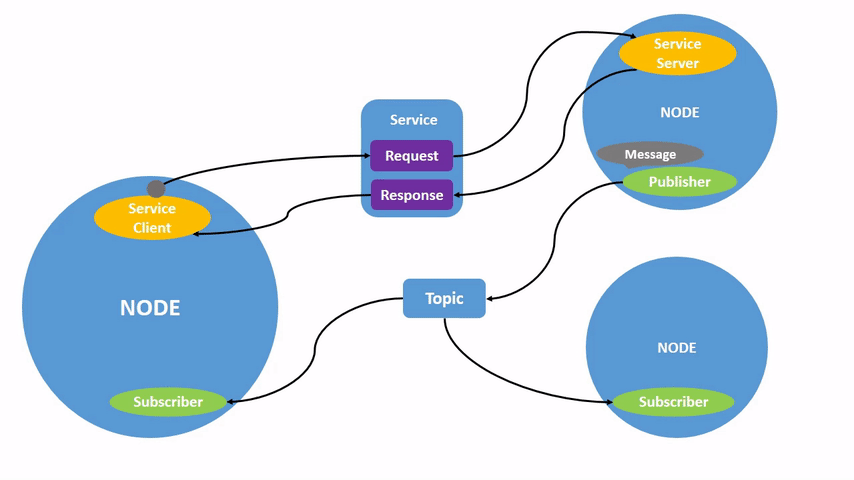
The ROS 2 graph represents the network of ROS 2 elements (nodes, topics, services, etc.) interacting in real-time. A robot system can be visualized as multiple nodes processing data together. Each node in ROS 2 serves a specific modular function (e.g., controlling motors or publishing sensor data).
Nodes in ROS 2
What is a Node?
A node is an executable responsible for a specific task (e.g., controlling motors, publishing sensor data) and communicates with other nodes via topics, services, actions, or parameters.Single or Multiple Nodes per Executable:
A single ROS 2 executable (written in C++ or Python) can contain multiple nodes.
1. ros2 run
The ros2 run command is used to run an executable from a specific package.
ros2 run <package_name> <executable_name>- Example to run the turtlesim:
ros2 run turtlesim turtlesim_nodeThis will open a window with a turtle in it.
2. ros2 node list
To list all active nodes in the ROS 2 system:
ros2 node list3. ros2 node info
The ros2 node info <node_name> command provides detailed information about a node’s publishers, subscribers, services, and actions.
- Example to get info about the
/turtlesimnode:
ros2 node info /turtlesim3.1 Remapping Node Names and Topics
- Remap the node name using
--ros-args --remap:
ros2 run turtlesim turtlesim_node --ros-args --remap __node:=my_turtle- This will rename
/turtlesimto/my_turtle. If you runros2 node list, you will see:
/my_turtle
/teleop_turtle
ROS 2 Topic Commands Cheat Sheet
Topics in ROS2
- What is a topic
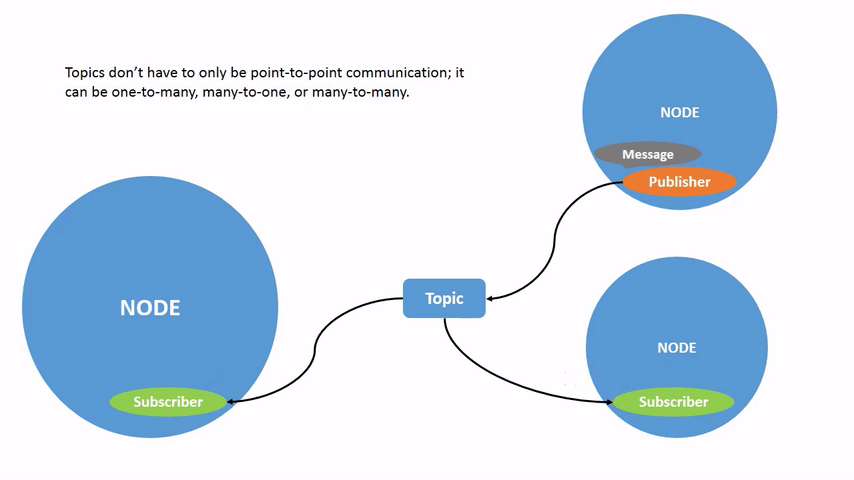
A topic in ROS 2 is a communication channel through which nodes can publish and subscribe to messages, enabling data exchange between them.
1. rqt_graph (Graphical Tool):
- Run rqt_graph to visualize the nodes and topics:
rqt_graph- Open via GUI:
rqt > Plugins > Introspection > Node Graph.
2. ros2 topic list:
- List all active topics:
ros2 topic list- List topics with types:
ros2 topic list -t3. ros2 topic echo:
- Display the data being published on a topic:
ros2 topic echo <topic_name>- Example: To see
/turtle1/cmd_veldata:
ros2 topic echo /turtle1/cmd_vel4. ros2 topic info:
- Get info about a specific topic:
ros2 topic info <topic_name>- Example: Info about
/turtle1/cmd_vel:
ros2 topic info /turtle1/cmd_vel5. ros2 interface show:
- Show the structure of a message type:
ros2 interface show <msg_type>- Example: For
geometry_msgs/msg/Twist:
ros2 interface show geometry_msgs/msg/Twist6. ros2 topic pub:
- Publish data to a topic:
ros2 topic pub <topic_name> <msg_type> "<args>"- Example: To continuously move the turtle:
ros2 topic pub /turtle1/cmd_vel geometry_msgs/msg/Twist "{linear: {x: 2.0, y: 0.0, z: 0.0}, angular: {x: 0.0, y: 0.0, z: 1.8}}"- Publish once:
ros2 topic pub --once <topic_name> <msg_type> "<args>"7. ros2 topic hz:
- View the rate of data publishing:
ros2 topic hz <topic_name>- Example: Check the rate for
/turtle1/pose:
ros2 topic hz /turtle1/pose8. ros2 topic bw:
- Check bandwidth usage for a topic:
ros2 topic bw <topic_name>- Example: Check bandwidth for
/turtle1/pose:
ros2 topic bw /turtle1/pose9. ros2 topic find:
- Find topics by message type:
ros2 topic find <msg_type>- Example: Find topics with
geometry_msgs/msg/Twisttype:
ros2 topic find geometry_msgs/msg/TwistROS 2 Services Cheat Sheet
Services in ROS2:
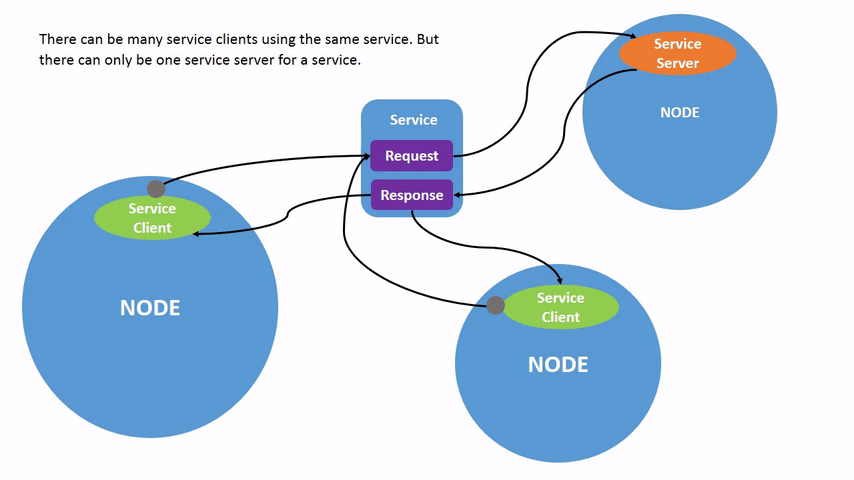
Services in ROS 2 follow a call-and-response model, where nodes request data from a service and receive a response. Unlike topics, services only provide data when specifically called by a client.
1. List Active Services:
- View all active services in ROS 2:
ros2 service list2. Service Type:
- Check the type of a service (e.g.,
/clear):
ros2 service type /clear3. Service Info:
- Get info about a service (e.g.,
/clear):
ros2 service info /clear4. Find Services by Type:
- Find services of a specific type:
ros2 service find std_srvs/srv/Empty5. Show Service Interface:
- View the request/response structure of a service:
ros2 interface show turtlesim/srv/Spawn6. Call a Service:
- Call a service with or without arguments:
ros2 service call /clear std_srvs/srv/Empty
ros2 service call /spawn turtlesim/srv/Spawn "{x: 2, y: 2, theta: 0.2, name: ''}"
7. Echo Service Data:
- View service communication (request/response):
ros2 service echo /add_two_intsHere is the content with the requested headings formatted as ####:
ROS 2 Parameters Cheat Sheet
Parameters in ROS2:
Parameters in ROS 2 are configuration values for nodes, like settings that can be integers, floats, booleans, strings, and lists. Each node can maintain its own parameters.
1. ros2 param list
- List all parameters for all nodes:
ros2 param list- Example output:
/teleop_turtle:
	scale_angular
	scale_linear
	use_sim_time
/turtlesim:
	background_b
	background_g
    background_r
    use_sim_time
2. ros2 param get
- Get the value and type of a parameter:
ros2 param get <node_name> <parameter_name>- Example to get the value of
/turtlesim background_g:
ros2 param get /turtlesim background_gOutput:
Integer value is: 863. ros2 param set
- Change a parameter’s value:
ros2 param set <node_name> <parameter_name> <value>- Example to change
/turtlesim background_r:
ros2 param set /turtlesim background_r 150Output:
Set parameter successful4. ros2 param dump
- View and save a node's parameters to a file:
ros2 param dump <node_name> > <file_name>.yaml- Example for
/turtlesim:
ros2 param dump /turtlesim > turtlesim.yaml5. ros2 param load
- Load parameters from a file into a node:
ros2 param load <node_name> <parameter_file>- Example:
ros2 param load /turtlesim turtlesim.yamlOutput:
Set parameter background_b successful
Set parameter background_g successful
Set parameter background_r successful
6. Load Parameter File on Node Startup
- Start a node with saved parameters:
ros2 run <package_name> <executable_name> --ros-args --params-file <file_name>- Example:
ros2 run turtlesim turtlesim_node --ros-args --params-file turtlesim.yamlHere's the version without any tabs before the code blocks:
ROS 2 Actions Cheat Sheet
Overview of Actions
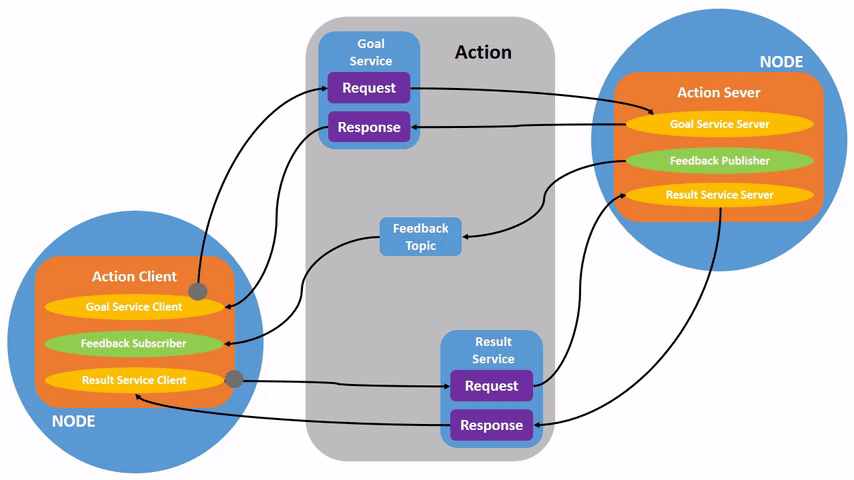
- Actions in ROS 2 are for long-running tasks that can be canceled and provide feedback.
- Actions are a combination of Goal, Feedback, and Result.
- They use a client-server model similar to topics but allow steady feedback and cancellation.
- Action Client sends goals to the Action Server, which processes the goal and sends feedback/results.
1. ros2 node info
- View a node's information, including its actions:
ros2 node info <node_name>- Example for
/turtlesim:
ros2 node info /turtlesimThis shows the Action Servers and Action Clients for the node.
2. ros2 action list
- List all actions in the ROS graph:
ros2 action listThis will return available actions such as /turtle1/rotate_absolute.
3. ros2 action type
- Check the action type for a specific action:
ros2 action type /turtle1/rotate_absolute- Output example:
turtlesim/action/RotateAbsolute4. ros2 action info
- View detailed information about an action:
ros2 action info /turtle1/rotate_absolute- Example output:
Action: /turtle1/rotate_absolute
Action clients: 1
    /teleop_turtle
Action servers: 1
    /turtlesim
5. ros2 interface show
- Inspect the structure of the action type:
ros2 interface show turtlesim/action/RotateAbsolute- This will show the structure of the goal, result, and feedback:
The desired heading in radians
float32 theta
---
The angular displacement in radians to the starting position
float32 delta
---
The remaining rotation in radians
float32 remaining
6. ros2 action send_goal
- Send a goal to an action server:
ros2 action send_goal <action_name> <action_type> <values>- Example:
ros2 action send_goal /turtle1/rotate_absolute turtlesim/action/RotateAbsolute "{theta: 1.57}"- Add
--feedbackto receive feedback during goal execution:
ros2 action send_goal /turtle1/rotate_absolute turtlesim/action/RotateAbsolute "{theta: -1.57}" --feedbackHere is the content with only the commands formatted without tabs:
Using rqt_console to view logs
1. Setup
Start rqt_console in a new terminal with the following command:
ros2 run rqt_console rqt_consoleNow, start turtlesim in a new terminal with the following command:
ros2 run turtlesim turtlesim_node2. Messages on rqt_console
To produce log messages for rqt_console to display, let’s have the turtle run into the wall. In a new terminal, enter the ros2 topic pub command below:
ros2 topic pub -r 1 /turtle1/cmd_vel geometry_msgs/msg/Twist "{linear: {x: 2.0, y: 0.0, z: 0.0}, angular: {x: 0.0,y: 0.0,z: 0.0}}"Press Ctrl+C in the terminal where you ran the ros2 topic pub command to stop your turtle from running into the wall.
3. Set the Default Logger Level
You can set the default logger level when you first run the /turtlesim node using remapping. Enter the following command in your terminal:
ros2 run turtlesim turtlesim_node --ros-args --log-level WARNHere is a cheat sheet for recording and playing back data using ros2 bag, excluding the previously mentioned commands:
Recording and Playing Back Data in ROS 2
Managing Topic Data
1. Setup
- Start the
/turtlesimand/teleop_turtlenodes. - Create a directory for saving recordings.
2. Choose a Topic
- To list available topics in your system, run:
ros2 topic list- To inspect the data of a topic, run:
ros2 topic echo <topic_name>3. Record Topics
- Single Topic:
Record a single topic:
ros2 bag record <topic_name>- Multiple Topics:
Record multiple topics and specify a custom bag file name:
ros2 bag record -o <file_name> <topic1> <topic2> ...- Record All Topics:
ros2 bag record -a4. Inspect Topic Data
- To see details about a recorded bag file:
ros2 bag info <bag_file_name>5. Play Topic Data
- To replay a bag file:
ros2 bag play <bag_file_name>Managing Service Data
1. Setup
- Start the
introspection_serviceandintrospection_clientnodes with Service Introspection enabled.
2. Check Service Availability
- List all available services:
ros2 service list- To check if Service Introspection is enabled on a specific service:
ros2 service echo --flow-style <service_name>3. Record Services
- Record a Specific Service:
ros2 bag record --service <service_name>- Record All Services:
ros2 bag record --all-services4. Inspect Service Data
- To inspect a recorded service data bag file:
ros2 bag info <bag_file_name>5. Play Service Data
- To replay service data from the bag file:
ros2 bag play --publish-service-requests <bag_file_name>